

+321 123 4567
info@test.com
  • Home
  • My Services
    • Web Design
    • Web Development
    • Technical Writing
    • Portfolio
  • My Thoughts
  • Free Tools
    • Photo Editor
    • Avatar Generator
    • Email Migration Tool
    • QR Code Generator
    • RSS to HTML Converter
    • IP Address Geolocation
    • Base64 Image Encoder
    • NATO Translator
    • All Tools
  • Contact
Home
Apple iOS
Using PlayStation Controller (DualShock 4) With iPad Without Jailbreak

Using PlayStation Controller (DualShock 4) With iPad Without Jailbreak

Wale Adekile
July 12, 2019

Before iOS 13, I had to jailbreak my iPhone or iPad to use DualShock 4. The jailbreak community is dying and the enthusiasm has gone down. Fewer people are willing to jailbreak their devices and I’m one of them. If you’re still on iOS 12, you’re out of luck and you would still need to jailbreak your iPhone or iPad to use a PlayStation 4 controller.


I’ve been using the public beta version of iOS 13 and I must say Apple made a lot of changes. Features we had to jailbreak our devices to use before now have been added. In addition, features that have been on Android OS have finally made their way to Apple devices.

How to Use DualShock 4 With iPad or iPhone without jailbreak

1. Make sure Bluetooth is turned on on your iPhone or iPad.

2. Press the PS button and Share button on your DualShock 4 until the LED starts blinking.
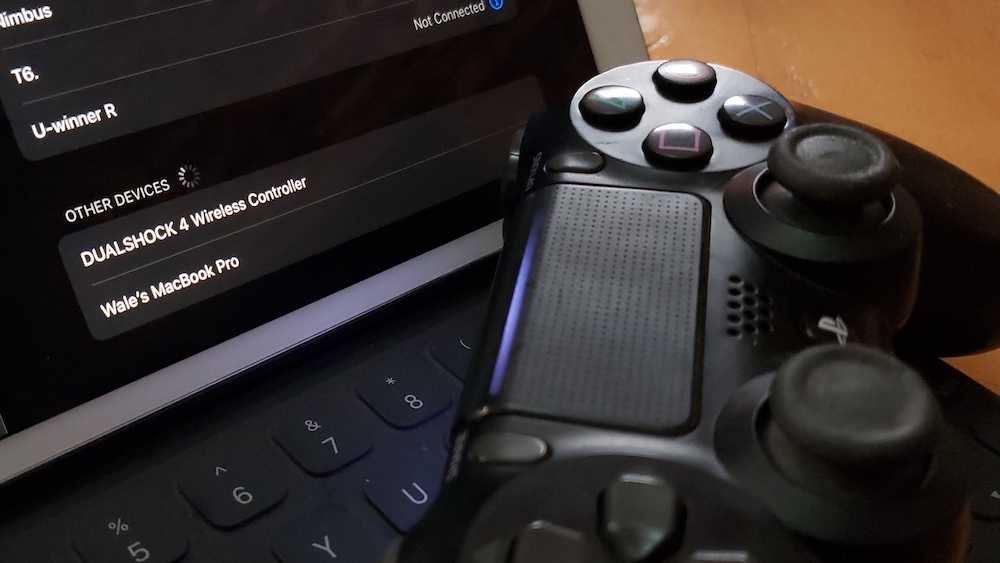
ps4 pad with ipad

3. Search for the PlayStation controller in the list of available devices.


4. Tap to connect and that’s it.

It can now be used to play native iOS games.

Is it any good?

Well, I’ve used this controller with quite a number of supported games without issues. I’ve even played PlayStation 4 games via Remote Play with the controller and it was perfect.

Do you still need an MFi controller?

I still have the SteelSeries Nimbus MFi controller I reviewed in the past. Now that DualShock 4 and other controllers work seamlessly with iOS, MFi game controllers may be rendered useless.


Previous Post
Bluedio T6 Review: Best Budget Wireless Headphones
Next Post
Tecno Phantom 9 Review
Wale Adekile
Husband to the world's most beautiful woman and father to two awesome kids. A nerd, obviously; also, a technical business analyst, a web designer who preaches the gospel of WordPress, and a writer. You can check out my published books on Amazon.
Apple iOS

Managing Music Collection in Your iPhone

12 years ago
iphone SE
Apple iOSUncategorized

iPhone SE, 9.7″ iPad Pro, iOS 9.3 & Highlights From The Apple Event

10 years ago

Recent Articles

yunmai massage gun mini 2.
Yunmai Massage Gun Mini 2 Review
BenQ LaptopBar Review: The Accessory I didn’t Know I Needed
teendow g20
Teendow Robot Vacuum G20 Review
Yunmai EasePro Massage Gun Review
bathroom
Dear Men, Spraying All Over the Toilet Seat is Disgusting and Irresponsible
winx mediatrans
How to Transfer Photos from iPhone to Computer Without iTunes
How to Use WhatsApp on an iPad
Things to Consider When Buying a MacBook
programmer
Learning to Code: A Comprehensive Guide for Beginners
identity thief
How to Efficiently Prevent Identity Theft

All contents on this blog are copyright protected and cannot be reproduced on other websites without permission.

Copyright © 2022 – NerdieDad | Home | Contact | About | Privacy Policy









