


If your iPhone 3GS is locked to AT & T, Verizon, T-Mobile or any other network, you may wish to use your iPhone 3GS with a different carrier other than your home carrier or if you have no choice but to unlock your iPhone before you can even use it, unlocking it is the only way out but there are certain precautions to be taken before unlocking an iPhone 3GS. Unlike iPhone 3G and iPhone 4, unlocking an iPhone 3GS has certain risks. Before you can unlock an iPhone 3GS, you may need upgrade the baseband to iPad baseband and to be candid, this may brick your iPhone. Not all iPhones 3GS can be upgraded to iPad baseband.
Note: If you’re unklocking an iPhone 3G, I suggest you check this post.
Disclaimer: I am not responsible if your phone gets bricked.
How do I know my baseband?
Go to Settings > General > About > Scroll down to Modem Firmware
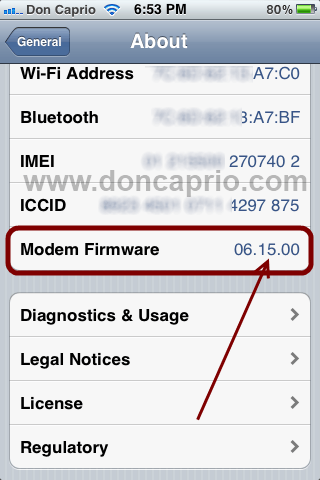
The following basebands are supported by this unlock method:
- 04.26.08
- 05.11.07
- 05.12.01
- 05.13.04
- 06.15.00
If your baseband isn’t any of the following, then you can’t perform this unlock on your iphone 3GS unless you upgrade to iPad baseband. If yours is listed above, simply scroll down straight to how to unlock your phone, and if not, keep reading.
Precautions to take before upgrading to iPad baseband
But wait… before you upgrade to iPad baseband (06.15.00), you must know your phone’s production date.
Actually, any iPhone 3GS manufactured after the 27th week of 2011 is likely to be damaged if you try to upgrade the baseband to 06.15.00. As far as I know, if your modem firmware is not the same as any of those listed above, you can’t unlock your iPhone 3GS without upgrading to iPad baseband.
How do I know the production week before upgrading to iPad baseband?
You can easily check the production week and year through the serial number and you can get that by going to Settings > General > About. This site offers that service, just enter your serial number in the space provided to know your production week and year.
Alternatively, you can check the 3rd, 4th & 5th digits in the serial number. The third represents the year and the fourth and fifth stands for the week.
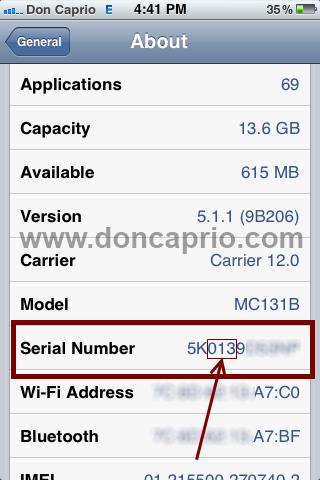
For example, if your serial number is xx013xxxxxX, 0 stands for 2010 and 13 means the 13rd week.
Also if your serial number looks like xx128xxxxxX, 1 means 2011 and 28 means it was produced in the 28th week. Trying to update this phone to iPad baseband my brick it and not advisable.
If you’ve checked your production date and your phone was made before the 28th week of 2011, you’re good to go. Follow the instructions below to unlock your iPhone 3GS.
How to unlock iPhone 3GS with Redsn0w
You must jailbreak your phone and install iPad baseband (if necessary) as explained earlier. For how to jailbreak and install iPad baseband, you may go through this post.
Your phone is jailbroken, right? Since your phone can’t detect a SIM card for now, you need to connect to a wi-fi.
– Launch Cydia
– Select the Search tab and search for Ultrasn0w
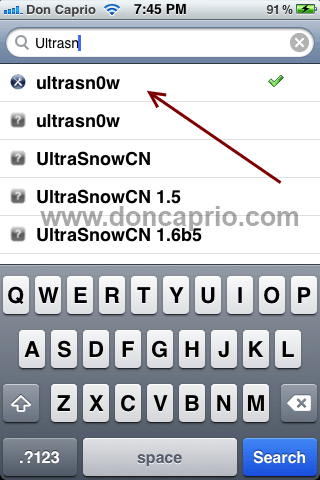
– Click on it and install.
– After installation, restart your phone twice. Insert a SIM card into your phone and your should now detect network peoperly.
If it displays No Service, then you didn’t restart your phone twice or you missed some steps. This works pretty well because I’ve done it quite a number of times before.













