

+321 123 4567
info@test.com
  • Home
  • My Services
    • Web Design
    • Web Development
    • Technical Writing
    • Portfolio
  • My Thoughts
  • Free Tools
    • Photo Editor
    • Avatar Generator
    • Email Migration Tool
    • QR Code Generator
    • RSS to HTML Converter
    • IP Address Geolocation
    • Base64 Image Encoder
    • NATO Translator
    • All Tools
  • Contact
Home
Android
How to Root Tecno R7 in 5 Minutes Without a PC

How to Root Tecno R7 in 5 Minutes Without a PC

Wale Adekile
June 9, 2014

We recently did a hands-on review of the Tecno R7 and this device, packed with a 6-core processor, sounds really powerful but surprisingly, rooting it takes less than 5 minutes. The bootloader isn’t locked and this makes the whole process a breeze.


Since you’re already reading this article, it is believed you already know why your device needs to be rooted, the advantages and of course, the ugly side of the whole thing.

Please note that rooting your Tecno R7 voids the 12-month warranty that comes with your device. Also, if your smartphone gets bricked in the process (though this is very, very unlikely), I will not be held responsible.

How to Root Tecno R7 with Framaroot

1. Download Framaroot from this link

2. Unzip and run the APK file

3. Open Framaroot


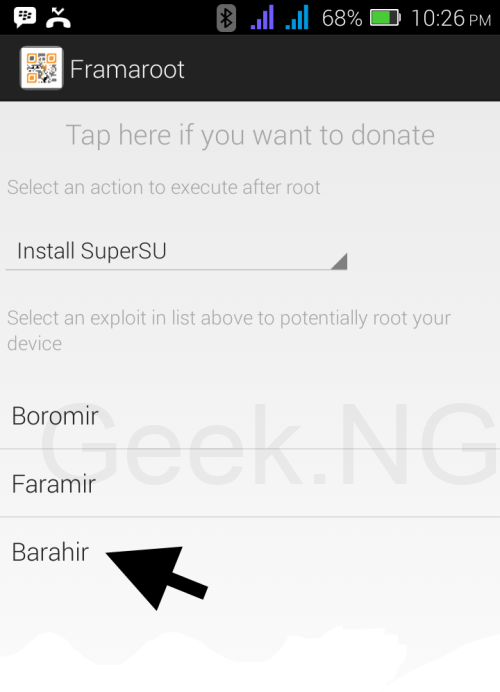
4. Select Barahir exploit
root-tecno-r7

5. After a few seconds, you should be notified that Superuser and su binary have been installed.

install-super-user-on-tecno-r7

6. Reboot your device and it’s all done.
root tecno r7

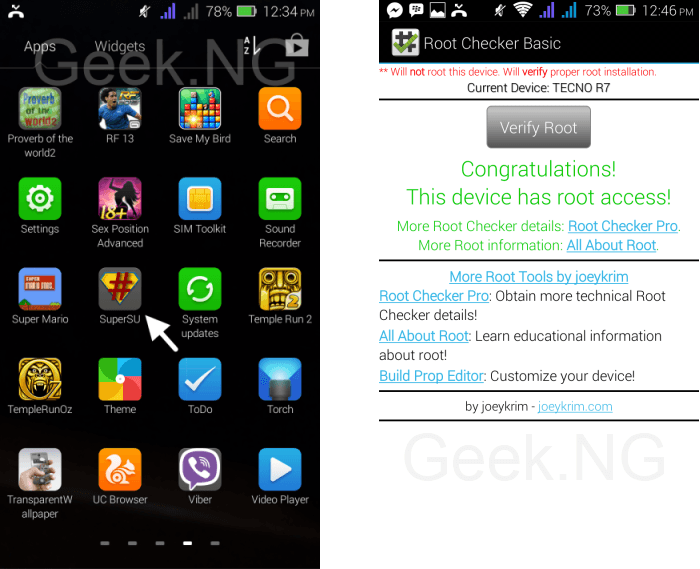
If you check your app drawer, you should  see Super SU already installed as shown in the image above. Also, you can check if your device is rooted by using Root Checker Basic.

Previous Post
Tecno R7 Hands-on Review: Super Fast Hexa-core Processor Android Smartphone
Next Post
Fix: Mozilla Firefox Black Screen, Freezing and Random Crashing
Wale Adekile
Husband to the world's most beautiful woman and father to two awesome kids. A nerd, obviously; also, a technical business analyst, a web designer who preaches the gospel of WordPress, and a writer. You can check out my published books on Amazon.
Infinix Zero 2 sideview
AndroidReview

Infinix Zero 2 Hands-on Review: Truly #TheNextHero

11 years ago
Huawei mate 8
AndroidEditorial

The Problem With Huawei’s EMUI & Xiaomi’s MiUI

10 years ago

Recent Articles

yunmai massage gun mini 2.
Yunmai Massage Gun Mini 2 Review
BenQ LaptopBar Review: The Accessory I didn’t Know I Needed
teendow g20
Teendow Robot Vacuum G20 Review
Yunmai EasePro Massage Gun Review
bathroom
Dear Men, Spraying All Over the Toilet Seat is Disgusting and Irresponsible
winx mediatrans
How to Transfer Photos from iPhone to Computer Without iTunes
How to Use WhatsApp on an iPad
Things to Consider When Buying a MacBook
programmer
Learning to Code: A Comprehensive Guide for Beginners
identity thief
How to Efficiently Prevent Identity Theft

All contents on this blog are copyright protected and cannot be reproduced on other websites without permission.

Copyright © 2022 – NerdieDad | Home | Contact | About | Privacy Policy









