


The iphone “iPhone” could not be restored. An unknown error occurred (1015)
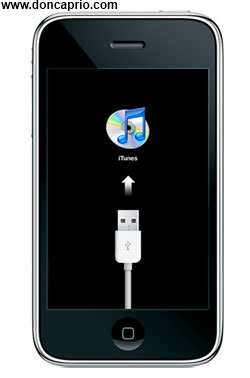
I kept getting this error message while trying to restore my iPhone some few weeks back and I was stuck in a never ending recovery loop. Each time the restore was about to complete, the error was coming up and I was being prompted to restore the phone again:
iTunes has detected an iPhone in recovery mode. You must restore this iPhone before it can be used with iTunes
I was confused about what to do but eventually came up with a solution. If you’ve previously jailbroken your iPhone and updated to iPad baseband, you’re most likely to encounter this issue. I was able to kick my phone out of recovery mode with this method and I guess it should work for you.
 – Download redsn0w_win_0.9.10b6 (Windows) | redsn0w_mac_0.9.10b6 (Mac)
– Run the software and click on Extras
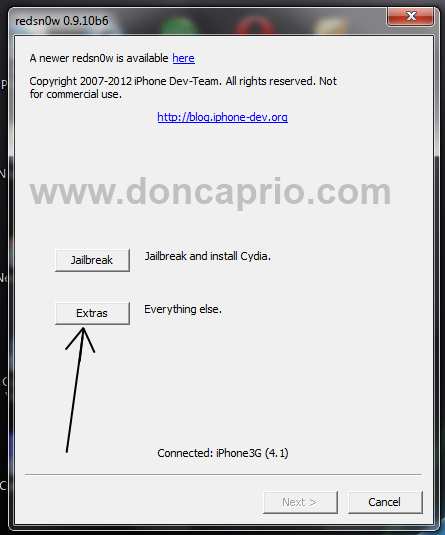 -Select your IPSW file. If you haven’t downloaded it, you should get it from here. Be sure you download the one that corresponds with your device!
– After that, click on Recovery Fix
– Turn off your iPhone by holding the power button for some seconds.
– Hit the Next button
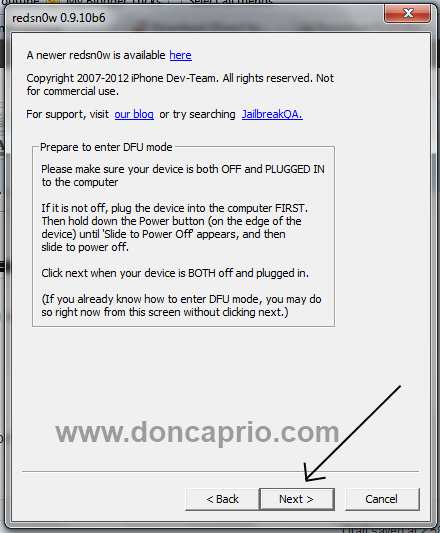 – Follow the instruction on the next page to get your phone into DFU mode
At this stage you will be presented with a screen where you will be guided on how to enter DFU mode. Quickly hold “Power” button and then while holding the “Power” button, you will now have to hold “Home” button too. Now after few seconds release “Power” button but keep holding “Home” button until installation begins.
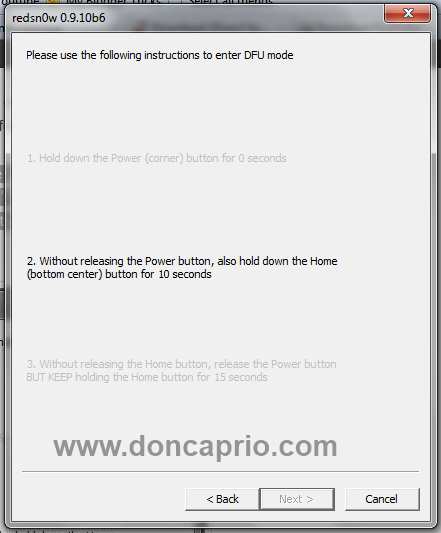 – In some seconds, your phone should restart and boot normally. This should fix your the error 1015 update error.













)
&description=&image=https://doncaprio.com/wp-content/uploads/2012/05/iphone-recovery-mode-2.jpg)