+321 123 4567
info@test.com
  • Home
  • My Services
    • Web Design
    • Web Development
    • Technical Writing
    • Portfolio
  • My Thoughts
  • Free Tools
    • Photo Editor
    • Avatar Generator
    • Email Migration Tool
    • QR Code Generator
    • RSS to HTML Converter
    • IP Address Geolocation
    • Base64 Image Encoder
    • NATO Translator
    • All Tools
  • Contact
Home
Uncategorized
How to Install Cydia After iOS 8.x Pangu Jailbreak

How to Install Cydia After iOS 8.x Pangu Jailbreak

Wale Adekile
October 29, 2014

If you followed our guide here on iOS 8 jailbreak, you’re probably looking for a way to install Cydia. You can SSH the .deb file to your device and this post explains how to do it step by step.


1. Open Pangu app.

2. Select OpenSSH and install
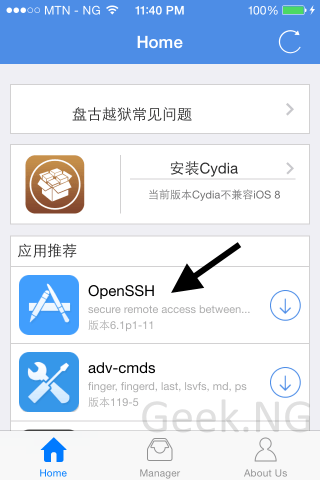
install open SSH

3. Select Manager and update Pangu (if there’s an available update) then reboot your device.
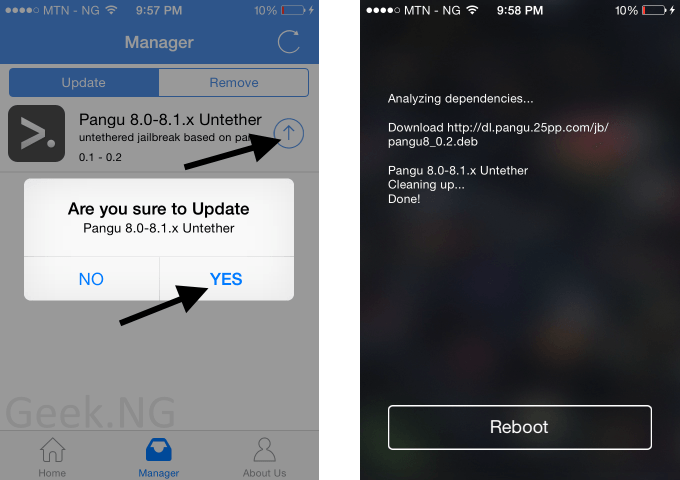
update pangu


4. Download the latest Cydia .deb file from here and the cydia-Iproj file from here.

5. Download and install WinSCP here.

6. Connect your PC and iOS device to the same WiFi hotspot.

7. On your device, go to Settings > Wi-Fi. Tap the i symbol and note your IP address.
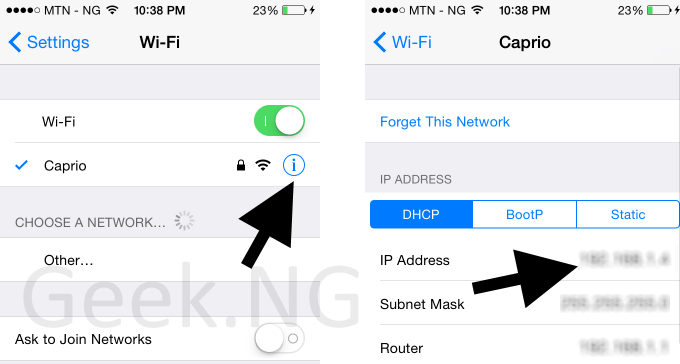
IMG_0529

8. Now start WinSCP. Enter the IP address as Host name, use root username and alpine as password. Hit the login button to start.
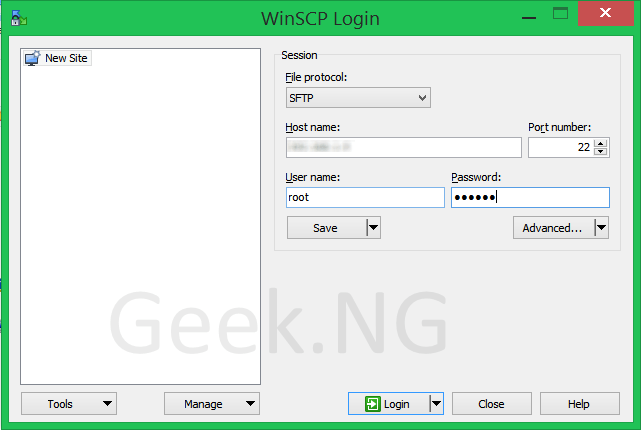
winscp


9. If a dialogue box comes up, click Yes.

10. You should now be logged in with the file manager appearing.
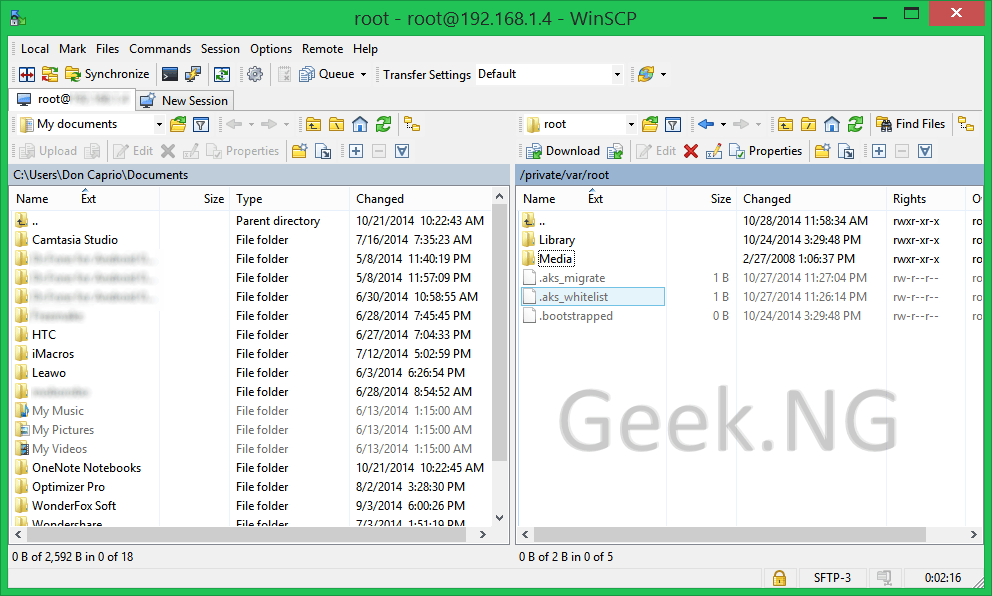
winscp iphone browser

11. On the right panel, double-click the Media folder to open. In this folder, right click, select New > Directory. Name the new folder Cydia. Open the newly created Cydia folder and create another folder named AutoInstall.

You should now have this path: /private/var/root/Media/Cydia/AutoInstall

Drag and drop the two .deb files you downloaded earlier into this directory and you’re almost done.
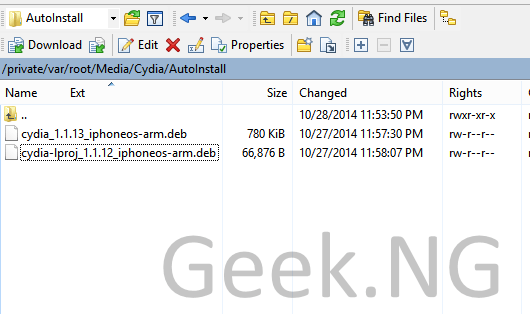
cydia autoinstall folder

12. Close WinSCP.

13. Turn off your phone completed using the power button and turn on again.

14. Again, turn off your device and turn on again.

15. Cydia should now be installed with the icon visible on your springboard.
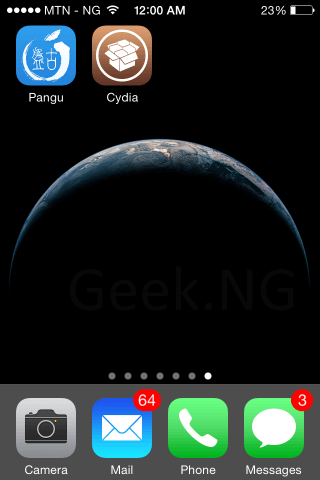
cydia installation on iOS 8

You should note that not every tweak in Cydia will work properly at this moment until they are upgraded to work with iOS 8.


Previous Post
How to Jailbreak iPhone/iPad/iPod on iOS 8.1 With Pangu
Next Post
Tecno Phantom Z Hands-On Review
Wale Adekile
Husband to the world's most beautiful woman and father to two awesome kids. A nerd, obviously; also, a technical business analyst, a web designer who preaches the gospel of WordPress, and a writer. You can check out my published books on Amazon.
Uncategorized

How To Access Blocked Sites Via Proxy

14 years ago
infinix hot
ReviewUncategorized

Infinix Hot X507: Quick Specifications & Unboxing Video

11 years ago

Recent Articles

yunmai massage gun mini 2.
Yunmai Massage Gun Mini 2 Review
BenQ LaptopBar Review: The Accessory I didn’t Know I Needed
teendow g20
Teendow Robot Vacuum G20 Review
Yunmai EasePro Massage Gun Review
bathroom
Dear Men, Spraying All Over the Toilet Seat is Disgusting and Irresponsible
winx mediatrans
How to Transfer Photos from iPhone to Computer Without iTunes
How to Use WhatsApp on an iPad
Things to Consider When Buying a MacBook
programmer
Learning to Code: A Comprehensive Guide for Beginners
identity thief
How to Efficiently Prevent Identity Theft

All contents on this blog are copyright protected and cannot be reproduced on other websites without permission.

Copyright © 2022 – NerdieDad | Home | Contact | About | Privacy Policy