

+321 123 4567
info@test.com
  • Home
  • My Services
    • Web Design
    • Web Development
    • Technical Writing
    • Portfolio
  • My Thoughts
  • Free Tools
    • Photo Editor
    • Avatar Generator
    • Email Migration Tool
    • QR Code Generator
    • RSS to HTML Converter
    • IP Address Geolocation
    • Base64 Image Encoder
    • NATO Translator
    • All Tools
  • Contact
Home
Wordpress
How to Safely Upgrade Your WordPress Blog

How to Safely Upgrade Your WordPress Blog

Wale Adekile
December 17, 2012

Every now and then, an update to WordPress is pushed to your dashboard. It’s always a good idea to upgrade your Worpress blog to the latest version of the software for some reasons. The update might be to introduce new features or even more importantly, to fix security issues. You can easily do the upgrade from your dashboard but being careless with the upgrade can be a costly mistake. You should be warned to do a backup before proceeding with the update just to be on the safer side. I’ve done the upgrade a number of times successfully without any issues but you never know when things can go wrong and this is why you should backup your files and database before proceeding.


How to backup WordPress files

You can back up your whole WordPress blog to a zip file from the cPanel by following these easy steps:

1. Log in to cPanel and go to your WordPress installation folder (likely to be public_html)

2. Select all files as shown below and then choose Compress:
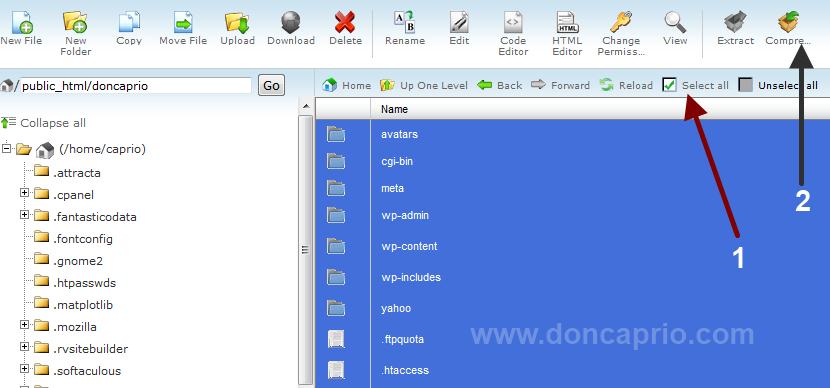
backup wordpress files

3. Select Zip Archive, rename to WordPress.zip and then click Compress files.
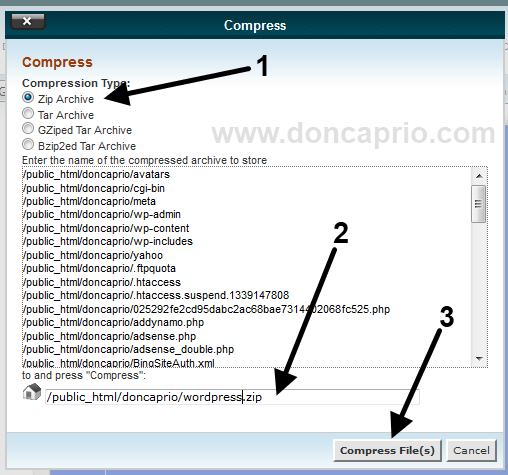

upgrade wordpress

With this done, you’ve now successfully backed up your themes, plugins, attachments and other things. The next step is to keep a copy of your database.

How to backup WordPress database before upgrading

1. Go to phpMyAdmin and select your WordPress database from the left

2. Under Copy database to, Click on Operations, give the database a name and select Go.
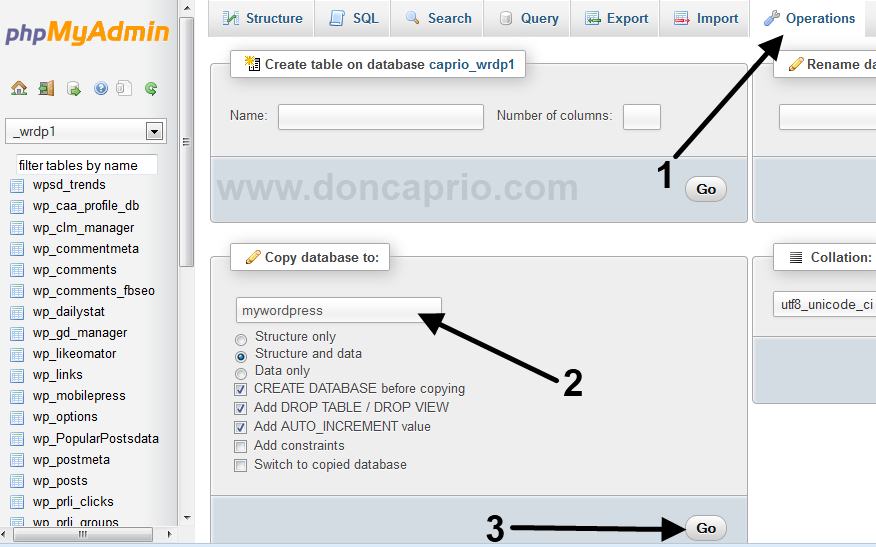
upgrading wordpress blog

This creates a copy of your WordPress database and it’s the easiest way to backup your database without actually downloading it to your PC.

Of course, anything shouldn’t should go wrong and the backup procedure above is only to keep you on the safer side. You can now proceed to your WordPress dashboard and perform the upgrade.


Previous Post
How to Remove Facebook Contacts From Whatsapp on iPhone
Next Post
7 Best Free Alternatives to Adobe Photoshop for Easier Photo Editing
Wale Adekile
Husband to the world's most beautiful woman and father to two awesome kids. A nerd, obviously; also, a technical business analyst, a web designer who preaches the gospel of WordPress, and a writer. You can check out my published books on Amazon.
facebook comment box for genesis
Wordpress

Adding Facebook Comment to Genesis Without a Plugin

12 years ago
Wordpress

7 Plugins & Tips to Effectively Manage a Multi-Author WordPress Blog

13 years ago

Recent Articles

yunmai massage gun mini 2.
Yunmai Massage Gun Mini 2 Review
BenQ LaptopBar Review: The Accessory I didn’t Know I Needed
teendow g20
Teendow Robot Vacuum G20 Review
Yunmai EasePro Massage Gun Review
bathroom
Dear Men, Spraying All Over the Toilet Seat is Disgusting and Irresponsible
winx mediatrans
How to Transfer Photos from iPhone to Computer Without iTunes
How to Use WhatsApp on an iPad
Things to Consider When Buying a MacBook
programmer
Learning to Code: A Comprehensive Guide for Beginners
identity thief
How to Efficiently Prevent Identity Theft

All contents on this blog are copyright protected and cannot be reproduced on other websites without permission.

Copyright © 2022 – NerdieDad | Home | Contact | About | Privacy Policy









