“Size Mismatch” error while downloading from Cydia is quite common but getting it fixed isn’t too hard (at least from what I experienced). The other day, iFunbox detected my jailbroken device as jailed and I was trying to download afc2add from Cydia to fix the issue. I was unable to proceed because this error kept popping up.
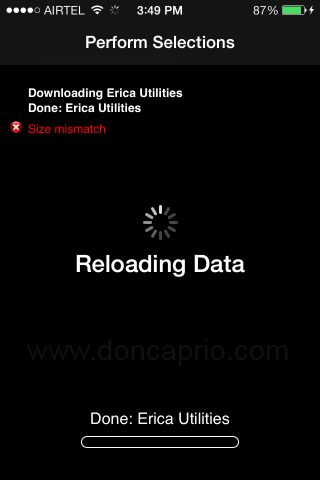
Size Mismatch: Discrepancy in Listed Package Size and Actual Package Size
I ran a search on Google but couldn’t get a working solution. It was said in a forum that this normally happens when the package in a repository is not the same size as is listed. For example, if a package is listed as 50kb in size and it’s actually bigger or smaller in size than what Cydia says, it’s not gonna install. It is said that the repo maintainer has to insert the correct size or checksum of the packaged deb file on the server.
Well, since I couldn’t contact the repo owner , this won’t work. Besides, I could always get the package from another repository.
Size Mismatch: Same Package, Different Sizes in Different Repos
What I observed was different though. The package in question was available in three different repositories. Two of them showed the same size and the third was a different. This package appeared as 55.1KB in two repositories and 54.0KB in the third one.
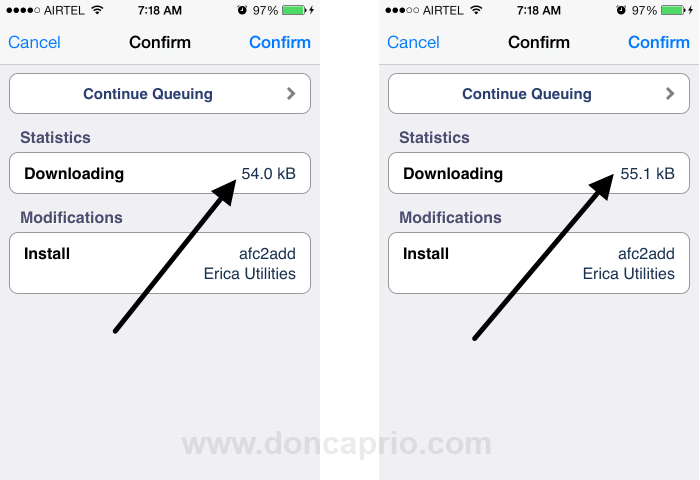
I tried downloading the package from all three repos but this same error kept popping up. The third package with a different size was one of those “shady” repositories you can’t really trust and I assumed that was where the problem was coming from.
The Simple Fix
All I did was to delete the repository showing a different size for this package and this fixed the issue. This might work for you too if the “Size Mismatch” error you’re getting is caused by having the same package with different sizes listed in different repositories.
If the error is actually caused by discrepancy in listed package size and actual package size, contacting the repository maintainer may be the only solution.