I’ve always wanted to backup all the sites on my cPanel to the cloud just in case something unexpected happens but it was almost impossible because of the huge size. This blog, along with my web forum and other sites hosted on my account is almost 6GB and I know I won’t be able to download that considering my “narrowband” internet connection and the cost of internet down here. If it were just a WordPress site, I could have decided to use Backup Buddy or something else but I’ve got Simple Machines Forum and other custom scripts installed so, I needed to backup the whole cPanel and not just a WordPress site.
How I did it
If your cPanel backup is up to 10GB and your internet connection sucks, you should think of buying a Windows VPS to get the job done instead of trying to download it to your PC. You don’t need a VPS with high specs, something minimal with Windows Server 2008 RC2 installed would do. You can buy a Windows VPS for as low as $10 per month just to get the job done and it’s what I did. ThrustVPS or Virpus may be a good start, you may be lucky enough if your host can help you install Windows Server 2008 R2 or whatever they have. Some VPS host often pre-install Windows Server 2008 R2 or later versions for you.
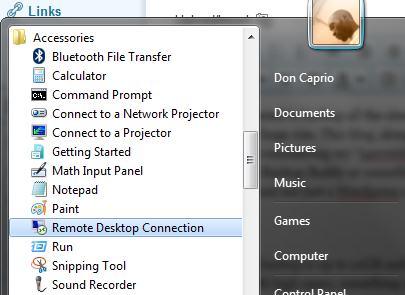
With this installed, you may now proceed to access your Windows Server through Remote Desktop Connection (RDC). You can connect by clicking Start > Accessories > Remote Desktop Connection
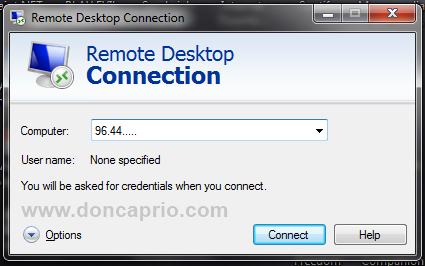
You should enter your Server IP address and Windows Server login details.
Now that you’ve logged in to your Windows Server through RDP, you cab launch Internet Explorer, login to your cPanel and generate a full backup.
Even if your internet connection is slow, you can download a file of 10GB under 1 hour using RDP. Just be sure your purchased server has enough capacity to download your cPanel.
Uploading the backup to the cloud
There are lots of Cloud storage service to choose from including SkyDrive and Google Drive among others but I went for Symform because it has more free space compared to others and there’s no file upload limit. Download and install their software and point the the application to your backup folder. You may need to install .NET Framework on your server before installing Symform.
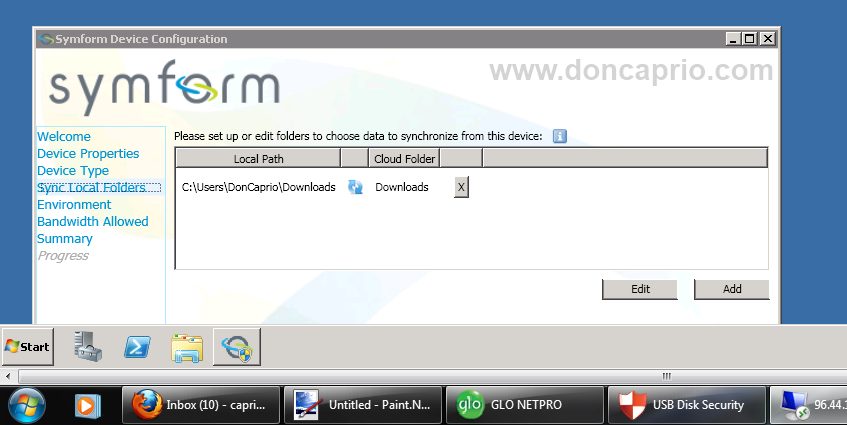
You can as well upload your downloaded backup to other cloud storage of your choice but the file upload limit may be a problem. you should split the file into parts with HJSplit if such is the case.