

+321 123 4567
info@test.com
  • Home
  • My Services
    • Web Design
    • Web Development
    • Technical Writing
    • Portfolio
  • My Thoughts
  • Free Tools
    • Photo Editor
    • Avatar Generator
    • Email Migration Tool
    • QR Code Generator
    • RSS to HTML Converter
    • IP Address Geolocation
    • Base64 Image Encoder
    • NATO Translator
    • All Tools
  • Contact
Home
Wordpress
Fix: WordPress Showing Mobile Site (WP Touch or Mobilepress) on Desktop

Fix: WordPress Showing Mobile Site (WP Touch or Mobilepress) on Desktop

Wale Adekile
April 22, 2014

I had to battle with this issue for a while before realizing the simple fix was sitting right there on my WordPress dashboard. It can be really frustrating when you check your website on PC only to be shown the mobile version. The case may even be reversed at times when the full version shows when the mobile version is supposed to be displayed on mobile gadgets. There are even times when  the view alternates between desktop and mobile view as you browse through inner pages.


Have you been experiencing this? This fix is simple but you may need to do a little troubleshooting first.

1. Check your mobile plugin settings

If you’re using a mobile plugin like Mobilepress, it’s always a good idea to check the settings if you’ve enabled something like “Force mobile site” option. On mobile press, be sure to check: WordPress Dashboard > Mobilepress > Settings > Force mobile site.

If the “Yes” option is selected, you’ll keep getting the mobile view on desktop no matter. It’s better to disable it.
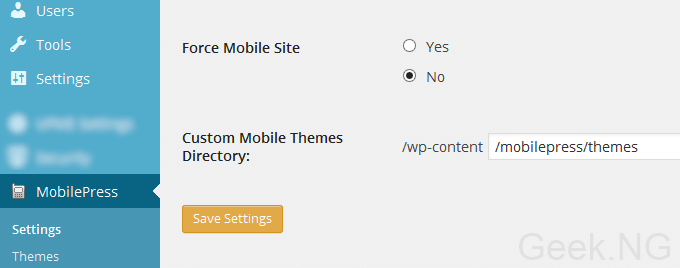
mobilepress settings

2. Check your Cache Settings

If the fix above didn’t solve it, this should work. Are you using a cache plugin? The problem may be from here and you need to check your cache settings. I use W3 Total Cache and if things are not done right, you will definitely experience this issue.

You only need to disable caching for mobile devices by following these steps:


  • Go to WP Dashboard > Performance > User Agent Groups
  • Check the boxes for low and high user agent groups as shown:
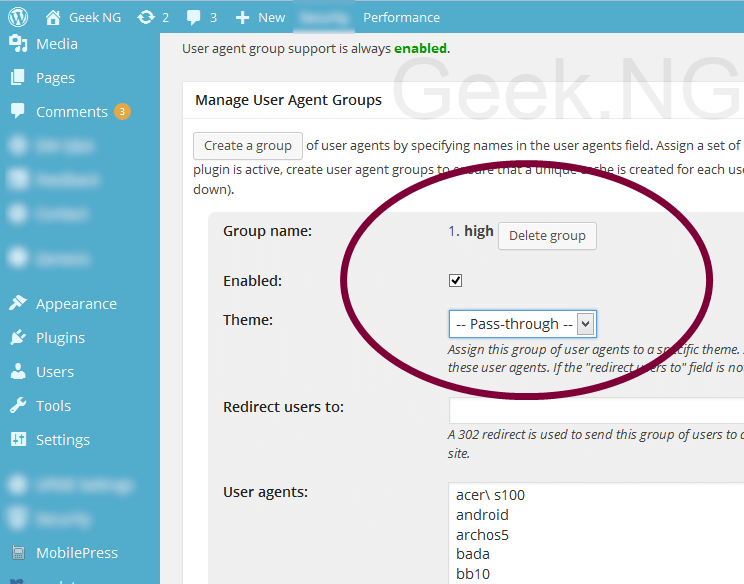
    w3 total cache mobile settings

  • Empty all caches from the Performance shortcut on the admin bar:

    empty cache

This should fix the problem. It’s all I did and ever since, the mobile version never displays on desktop. Are you still facing issues after doing all these?




Previous Post
Fix: Windows 8 PC Display Whitens on Battery
Next Post
How to Deal With Adsense Click Bombing on Your Blog
Wale Adekile
Husband to the world's most beautiful woman and father to two awesome kids. A nerd, obviously; also, a technical business analyst, a web designer who preaches the gospel of WordPress, and a writer. You can check out my published books on Amazon.
WindowsWordpress

How to Install WordPress Locally without a Hosting Account

14 years ago
create your own wordpress theme with photoshop
Wordpress

How to Create your Own Custom WordPress Theme Easily

13 years ago

Recent Articles

yunmai massage gun mini 2.
Yunmai Massage Gun Mini 2 Review
BenQ LaptopBar Review: The Accessory I didn’t Know I Needed
teendow g20
Teendow Robot Vacuum G20 Review
Yunmai EasePro Massage Gun Review
bathroom
Dear Men, Spraying All Over the Toilet Seat is Disgusting and Irresponsible
winx mediatrans
How to Transfer Photos from iPhone to Computer Without iTunes
How to Use WhatsApp on an iPad
Things to Consider When Buying a MacBook
programmer
Learning to Code: A Comprehensive Guide for Beginners
identity thief
How to Efficiently Prevent Identity Theft

All contents on this blog are copyright protected and cannot be reproduced on other websites without permission.

Copyright © 2022 – NerdieDad | Home | Contact | About | Privacy Policy









