

+321 123 4567
info@test.com
  • Home
  • My Services
    • Web Design
    • Web Development
    • Technical Writing
    • Portfolio
  • My Thoughts
  • Free Tools
    • Photo Editor
    • Avatar Generator
    • Email Migration Tool
    • QR Code Generator
    • RSS to HTML Converter
    • IP Address Geolocation
    • Base64 Image Encoder
    • NATO Translator
    • All Tools
  • Contact
Home
Windows
Fix: Huawei Modem Blue Screen (BSOD) Error on Windows 8

Fix: Huawei Modem Blue Screen (BSOD) Error on Windows 8

Wale Adekile
December 30, 2012

One of the first problems I encountered on Windows 8 was the blue screen of death (BSOD) I got while trying to connect to the internet using my unlocked Huawei modem. I was able to install the driver successfully and the dashboard icon displayed right on the desktop but each time I tried to connect to the internet, I kept getting this annoying blue screen with some BAD_POOL_CALLER error showing on the screen.


fix BAD_POOL_CALLER error with huawei modem on windows 8

The problem actually has to do with the modem driver. At the moment, the drivers available for most models of  Huawei USB modems are not compatible with Windows 8. So, updating your modem driver as suggested by some people may not even fix the issue (unless Huawei does something).

How to Fix the Error

I tried installing the modem driver in compatibility mode but it never worked. I tried it in Windows 7 and Windows XP SP3 compatibilty mode but I got a different error. The modem connected but won’t open a page as data is neither sent nor received. After some hours, I traced the problem to my device manager.

AD: Huawei Ascend Y300 Displayschutzfolie

– Go to the bottom-left of the screen and right-click on the the Start button, then select Device Manager
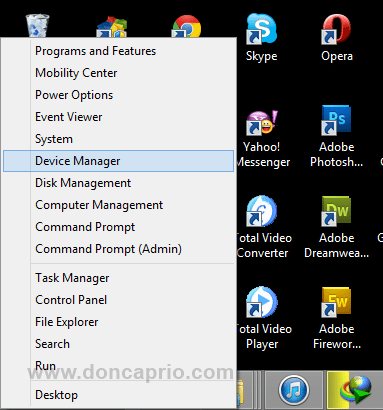

huawei crash

– Under Network Adapters, right-click on Huawei Mobile Connect and disable it as shown below:
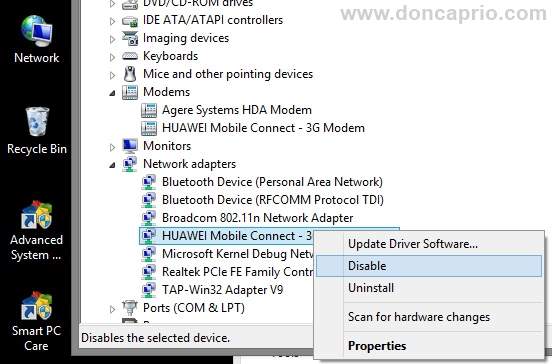
huawei crash

– Now launch your modem software and go to Tools > Options. Under the General tab, change the connection type from NDIS to Modem or RAS.

fix huawei crash on windows 8

This is all I did that fixed the constant crash I kept getting with my Huawei USB modem on Wondows 8. Hope it works for you too.



Previous Post
How to Downgrade from iOS 6.0.1 to 5.1.1 Without Saved SHSH Blobs
Next Post
Giveaway #8: Win 7 WinX DVD Ripper Platinum Free License Codes
Wale Adekile
Husband to the world's most beautiful woman and father to two awesome kids. A nerd, obviously; also, a technical business analyst, a web designer who preaches the gospel of WordPress, and a writer. You can check out my published books on Amazon.
1-Disk-Drill-Cover
Windows

Free and Easy Photo Recovery Software for Windows

8 years ago
Windows

Activating “god mode” in Windows 7

14 years ago

Recent Articles

yunmai massage gun mini 2.
Yunmai Massage Gun Mini 2 Review
BenQ LaptopBar Review: The Accessory I didn’t Know I Needed
teendow g20
Teendow Robot Vacuum G20 Review
Yunmai EasePro Massage Gun Review
bathroom
Dear Men, Spraying All Over the Toilet Seat is Disgusting and Irresponsible
winx mediatrans
How to Transfer Photos from iPhone to Computer Without iTunes
How to Use WhatsApp on an iPad
Things to Consider When Buying a MacBook
programmer
Learning to Code: A Comprehensive Guide for Beginners
identity thief
How to Efficiently Prevent Identity Theft

All contents on this blog are copyright protected and cannot be reproduced on other websites without permission.

Copyright © 2022 – NerdieDad | Home | Contact | About | Privacy Policy









