+321 123 4567
info@test.com
  • Home
  • My Services
    • Web Design
    • Web Development
    • Technical Writing
    • Portfolio
  • My Thoughts
  • Free Tools
    • Photo Editor
    • Avatar Generator
    • Email Migration Tool
    • QR Code Generator
    • RSS to HTML Converter
    • IP Address Geolocation
    • Base64 Image Encoder
    • NATO Translator
    • All Tools
  • Contact
Home
Mobile
Fix Google Play Store Error: Invalid Credit Card Number

Fix Google Play Store Error: Invalid Credit Card Number

Wale Adekile
March 14, 2016

I was trying to pay for an item last weekend at the Play Store and had to replace the expired debit card I had on record. I input the new debit card details but it wasn’t accepted. This is the same card I use at the App Store, it’s the same one I use to settle web hosting charges and several other services online.


The exact error message was “Invalid credit card number.”
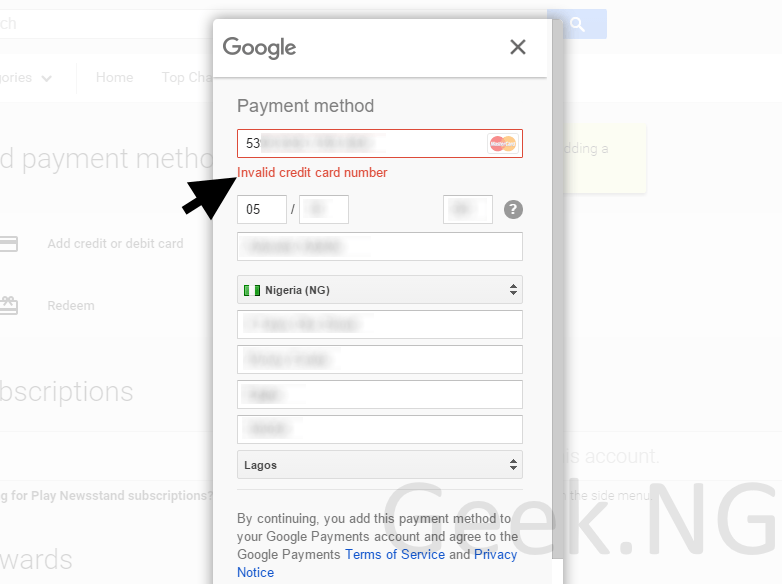
google play error

I don’t know exactly which this error kept showing despite the fact that the details were correctly keyed in. After dozens of trials, here’s what I finally did.

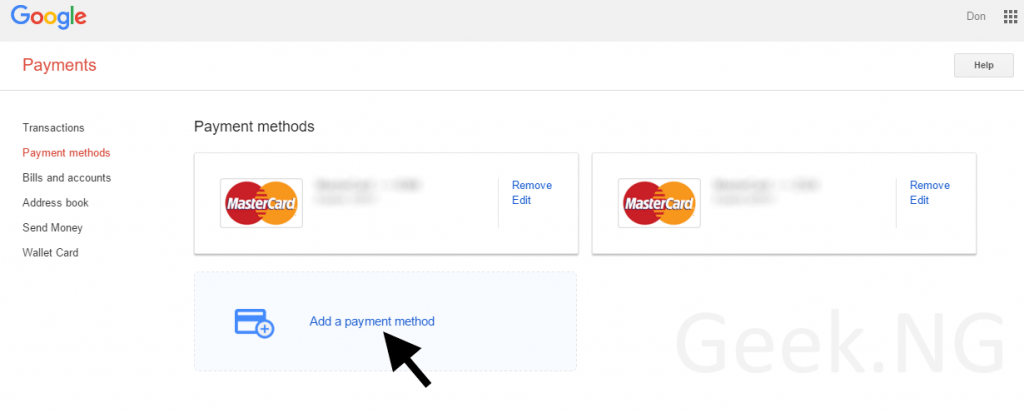
  1. Go to payments.google.com and sign in. If you’re logging in for the first time, you may need to accept the terms and conditions.
  2. Go to the billing section and add your debit/credit card correctly.google payments

Except the credit card isn’t allowed for use in the Play Store or it’s blocked already, it should be accepted. This isn’t guaranteed to work for every case of “invalid credit card number” error but it’s worth giving a shot. In case this doesn’t work for you, Google gives some suggestions:

  • Try a different payment method: If you have some other cards, you can give them a shot. I sure did this and all them were rejected with the same “invalid credit card number” error.
  • Force the Play Store to stop, and clear the cache and data: I tried this too and it never worked but you can still give it a shot.
  • Contact your bank: You may need to verify with your bank if your card is enabled for online purchase if you haven’t previously used it online.
  • Contact Google: If after everything it still doesn’t work, perhaps you need to contact Google to resolve any possible issue with your account.


Previous Post
7 Important Data Security Tips For Small Businesses
Next Post
#TheNextBigThing: Tecno Is Adopting A New UI On Its Upcoming Device
Wale Adekile
Husband to the world's most beautiful woman and father to two awesome kids. A nerd, obviously; also, a technical business analyst, a web designer who preaches the gospel of WordPress, and a writer. You can check out my published books on Amazon.
infinix note 3 back
Mobile

Infinix Note 3: Unboxing and First Impressions

9 years ago
tecno camon c9
MobileNews

Tecno Camon C9: Details On Exciting Features To Expect

10 years ago

Recent Articles

yunmai massage gun mini 2.
Yunmai Massage Gun Mini 2 Review
BenQ LaptopBar Review: The Accessory I didn’t Know I Needed
teendow g20
Teendow Robot Vacuum G20 Review
Yunmai EasePro Massage Gun Review
bathroom
Dear Men, Spraying All Over the Toilet Seat is Disgusting and Irresponsible
winx mediatrans
How to Transfer Photos from iPhone to Computer Without iTunes
How to Use WhatsApp on an iPad
Things to Consider When Buying a MacBook
programmer
Learning to Code: A Comprehensive Guide for Beginners
identity thief
How to Efficiently Prevent Identity Theft

All contents on this blog are copyright protected and cannot be reproduced on other websites without permission.

Copyright © 2022 – NerdieDad | Home | Contact | About | Privacy Policy