I wrote earlier on unlocking ZTE and Huawei modems on this post and it works quite well but lots of comments made me re-write the post with more details. I’ve used DC unlocker with lots of ZTE modems including MF110, MF190, MF180, MF673u and more. Unlike Huawei modems that can be easily unlocked by generating the unlock code using the IMEI, there are certain steps to take to unlock a ZTE USB modem with DC Unlocker. If your model number is not listed, you can still try it anyway.
You’ll need DC unlocker to get this done and you may download here.
How to Unlock ZTE Modems
– Insert an alien SIM into the modem, I mean an unsupported SIM from a different network
– Plug in your USB modem to the computer and start the default modem software. What I mean by the default program is the program from which you connect the modem to your home network.
– When you’re prompted for an unlock code, close the program but be sure the modem remains plugged in.
– Disconnect all internet connections and run DC Unlocker
– Click on server and input doncaprio as username and password.
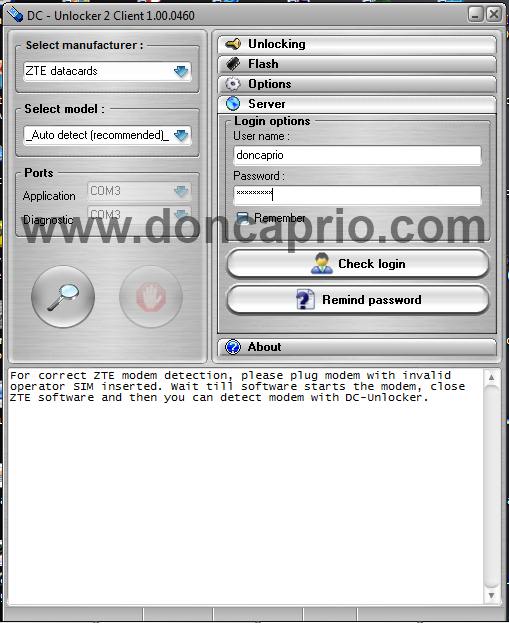
– Under Select Manufacturer, choose ZTE datacards
– Under Select models, just leave it at Auto detect as shown above.
– Click on the magnifying glass to search for your modem.
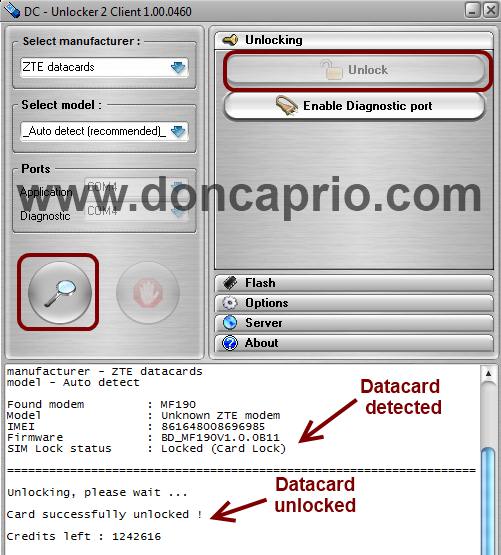
– When your datacard is detected, click on unlock. Your modem should be unlocked after some seconds.
As you can see in the image above, that screenshot was taken when I was unlocking a friend’s ZTE MF190 from Airtel. It was successfully unlocked without any errors.
What you should do after unlocking your modem.
OK, you’ve unlocked your mode, now and it now accepts SIM cards from different network providers but that’s not the end of it. Without creating data profiles for these networks, you probably won’t be able to use the modem on other networks.
Based on the provider you use and what the default program user interface looks like, you must locate where to create a new configuration profile. For me, it’s just under Tools > Options > Profile Management
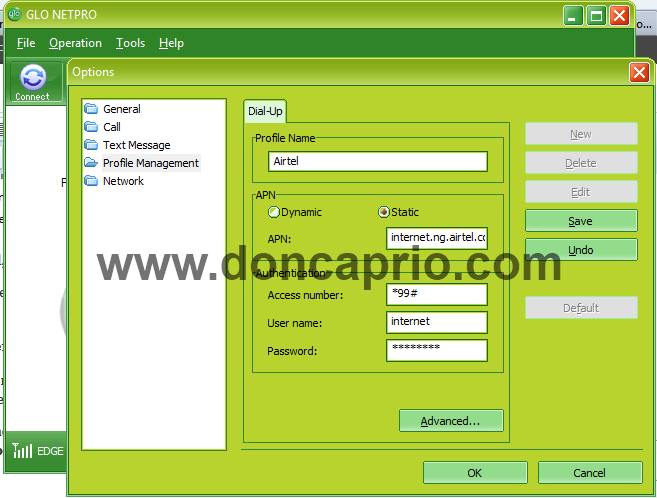
You must create a new settings for each provider you intend to use. You only need the Access Point Name (APN), Username and Password. You’re to select static APN and use *99# as access number in most cases.
MTN NG
- Access Point Name (APN): web.gprs.mtnnigeria.net
- APN type: static
- Access number: *99#
- Username: web
- Password: web
GLO NG
- Access Point Name (APN): gloflat
- APN type: static
- Access number: *99#
- Username: flat
- Password: flat
AIRTEL NG
- Access Point Name (APN): internet.ng.airtel.com
- APN type: static
- Access number: *99#
- Username: internet
- Password: internet
ETISALAT NG
- Access Point Name (APN): etisalat
- APN type: static
- Access number: *99#
- Username: leave blank
- Password: leave blank
These are for some of the major Nigerian networks. You should try to find out the configuration settings that works with all your networks to get the most out of the unlocked ZTE modem.