

+321 123 4567
info@test.com
  • Home
  • My Services
    • Web Design
    • Web Development
    • Technical Writing
    • Portfolio
  • My Thoughts
  • Free Tools
    • Photo Editor
    • Avatar Generator
    • Email Migration Tool
    • QR Code Generator
    • RSS to HTML Converter
    • IP Address Geolocation
    • Base64 Image Encoder
    • NATO Translator
    • All Tools
  • Contact
Home
Wordpress
Customize MobilePress Theme – Add Thumbnail and Post Summary / Excerpt

Customize MobilePress Theme – Add Thumbnail and Post Summary / Excerpt

Wale Adekile
April 28, 2012

Here we go again – another MobilePress tutorial to customize your WordPress mobile version. If you went through the post I made this morning, you should now have a better looking mobile version with colors that match your full version theme. Adding excerpt or post summary with thumbnails is a lot easier and you should be able to get it done in just a couple of minutes even if you’re new to WordPress. There isn’t much editing to do as I’ve simplified it totally. You’re only editing the css file in this tutorial, the rest is nothing but a piece of cake. 😀 Okay, let’s stop talking and get straight to business! Can you see the screenshot below? Your Mobilepress is going to look just like that in a couple of minutes if you follow this guide closely.
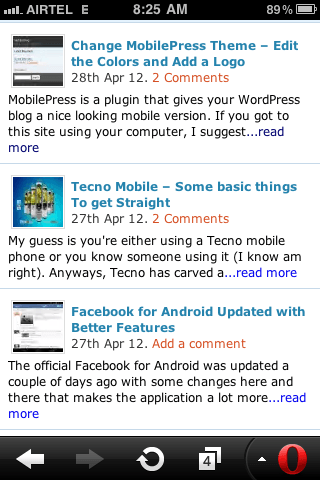

how to add post summary and thumbnial images to mobilepress1. Log in to your cPanel and naviage to ./public_html/wp-content/plugins/mobilepress/system/themes/default/

2. Open header.php with editor and search for /* Structure */

3. Right below that, paste this code:

img.wp-post-image {
float:left;
margin-right:2px;
width:50px;
height:50px;
padding:1px;
border:solid 1px #ddd; }

4. Save your changes.

5. You’re still in that folder right? I mean ./public_html/wp-content/plugins/mobilepress/system/themes/default/ ? Now upload these attached files (index.php, functions.php and archive.php) to that folder. You should overwrite the existing ones.


scripts.zip

6. In case you want to revert to your old look later, I suggest you download the default index.php and archive.php before replacing it with my modified ones.

Be sure to activate the default theme for iPhone too under Mobilepress settings on your dashboard else, iPhone users will still see that boring look. You should now check your blog on your mobile phone to see your Mobilepress display post thumbnails and post excerpt / summary on the homepage and category pages.


Previous Post
Change MobilePress Theme – Edit the Colors and Add a Logo
Next Post
How to Open / Merge / Join Files with .001, .002 File Extensions
Wale Adekile
Husband to the world's most beautiful woman and father to two awesome kids. A nerd, obviously; also, a technical business analyst, a web designer who preaches the gospel of WordPress, and a writer. You can check out my published books on Amazon.
genesis
Wordpress

Reposition Secondary Navigation Menu Above Header in Genesis Child Themes

13 years ago
how to migrate, move, copy or export blog posts from blogger to wordpress
BloggerWordpress

Moving Your Blog From Blogger To WordPress Without Losing Traffic And SEO

14 years ago

Recent Articles

yunmai massage gun mini 2.
Yunmai Massage Gun Mini 2 Review
BenQ LaptopBar Review: The Accessory I didn’t Know I Needed
teendow g20
Teendow Robot Vacuum G20 Review
Yunmai EasePro Massage Gun Review
bathroom
Dear Men, Spraying All Over the Toilet Seat is Disgusting and Irresponsible
winx mediatrans
How to Transfer Photos from iPhone to Computer Without iTunes
How to Use WhatsApp on an iPad
Things to Consider When Buying a MacBook
programmer
Learning to Code: A Comprehensive Guide for Beginners
identity thief
How to Efficiently Prevent Identity Theft

All contents on this blog are copyright protected and cannot be reproduced on other websites without permission.

Copyright © 2022 – NerdieDad | Home | Contact | About | Privacy Policy









