


Facebook changes all the time. Please check the updated version of this article instead.
OK, you’re sick of facebook timeline, right? Facebook timeline has finally gone public and believe me, your old profile is gone for good! There are just three things you can do with timeline even if you don’t feel convenient with it: you either get used to it, delete old posts if you’re not comfortable with or totally hide it. I’ll be explaining the simple steps you need to take to completely hide your timeline from both friends and public. You should note that these tips won’t make your timeline totally disappear, it only limits it to a certain degree.
Note that after these steps are taken, you will have a completely blank wall. No timeline and no story on your wall feed, got it? We are hiding everything!
1. Hiding Your Friends from Timeline
I already wrote a post on this so there’s absolutely no point in repeating it in this article. Follow this link to learn how to hide your friends list from your timeline.
2. Hiding Your Recent Activities from Timeline
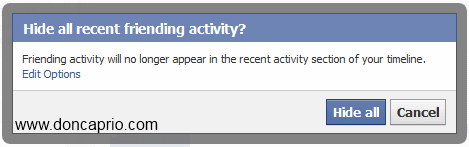
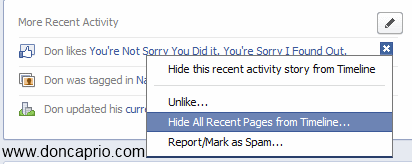
The next thing we’re going to do is hiding those recent friends, likes and other activities from your profile. Beside each activity is a tiny X button. Click on this and select the options that says remove all similar activity or hide all.
For recent friending activities, you do it as shown below:

Confirm your settings:
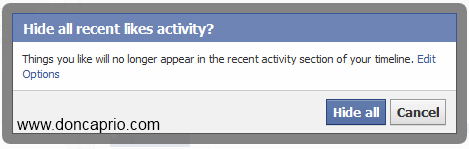
You should also hide your recent likes and all other activities from your timeline.
3. Controlling your Privacy Settings to Hide Wall Posts
From the drop down menyu at the top-right, go to your privacy settings. If you’ve made some public posts in the past, you first need to make sure you limit the availability of those posts. Scroll down and select Manage Posts Availability. Confirm this when the dialogue box pops up.
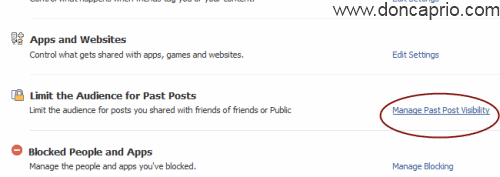
Select Limit Old Posts on on the box that pops up.
Next, you need to control how you connect with people on Facebook. Click on How you Connect and set it as shown below:
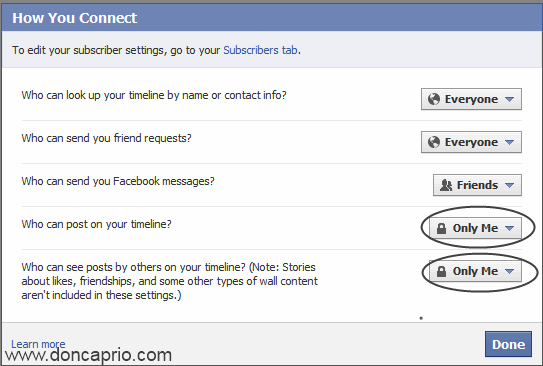
4. Controlling Photo / Post Tags Visibility
Next, select How tags work and select Custom from the options.
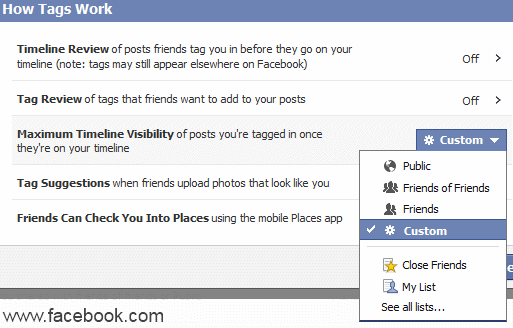
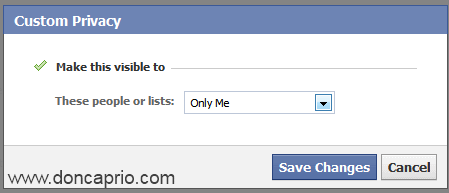
Wait a couple seconds till the next settings comes up. Select Only Me from the options.
Unlike the old facebook wall, it’s almost impossible to hide timeline fully even with all these settings in place. At most, visibility of some events ot items can only be limited. Instead of trying to hide or limit your timeline with privacy settings, you may want to completely wipe your facebook timeline clean with a Firefox addon that deletes everything you’ve ever posted on facebook.













