+321 123 4567
info@test.com
  • Home
  • My Services
    • Web Design
    • Web Development
    • Technical Writing
    • Portfolio
  • My Thoughts
  • Free Tools
    • Photo Editor
    • Avatar Generator
    • Email Migration Tool
    • QR Code Generator
    • RSS to HTML Converter
    • IP Address Geolocation
    • Base64 Image Encoder
    • NATO Translator
    • All Tools
  • Contact
Home
Android
How to Root Tecno Boom J7 in One Click

How to Root Tecno Boom J7 in One Click

Wale Adekile
May 12, 2015

Rooting Tecno Boom J7 is pretty easy and you don’t even need a PC to get it done. All that’s needed is the required APK file and you should be done in less than 3 minutes.


Also read: Tecno Boom J7 Review: The Android Music Phone You Would Like

By reading this article and following the guide herein, I’m assuming you know exactly what you’re doing and why you’re doing it. If rooting sounds new to you and you’re wondering what it means, why you should do it and what the benefits are, I suggest you should read this post.

Disclaimer: Please note that rooting your device may void your warranty or brick your device but in most cases, it is a safe process. You’re doing this at your own risk and I’m not responsible for any damage or complications arising from following the steps in this educational article.

Steps

1. Download and install Kingroot from the official site or through this direct download link.

2. If you’re unable to install, be sure installation of apps from unknown sources is enabled from Settings > Security > Check Unknown Sources.


3. Be sure your data/WiFi connection is turned on and run the application.

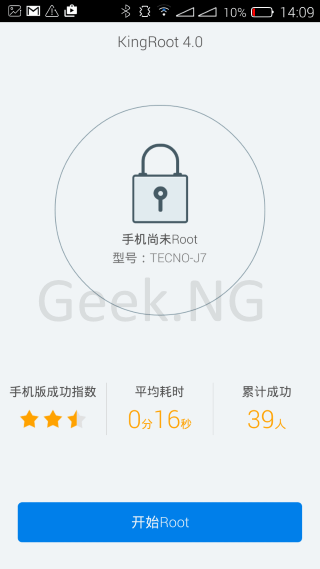
4. Tap the blue button at the bottom to start rooting.
root-boom-j7

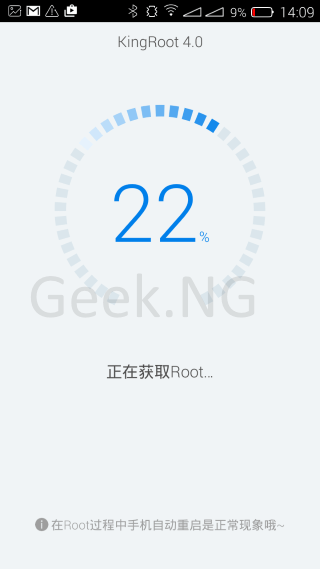
5. It may take up to 3-5 minutes but all you need to do is just wait till the reading gets to 100%…
root-tecno-boom-j7

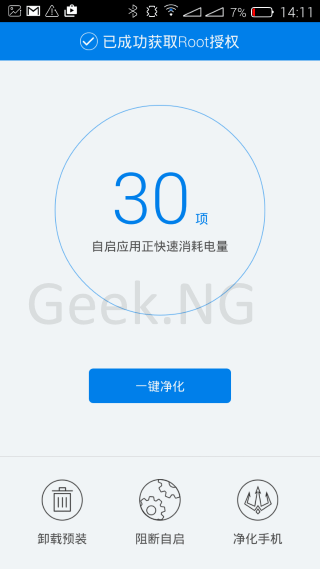
6. After a while, the process should complete and this should be dispayed. I’m only guessing the text at the top says “Rooting successfully completed”. I don’t understand Chinese, do you? 🙂
root-boom-j7-kingroot


Tap the blue button with Chinese text to go to the next page.

7. This page appears  but I guess the rooting is already completed by now.

Screenshot_2015-05-12-14-12-078. And then this:

Screenshot_2015-05-12-14-12-21

9. Hitting the blue button should take you to this page showing a passmark.

Screenshot_2015-05-12-14-12-43

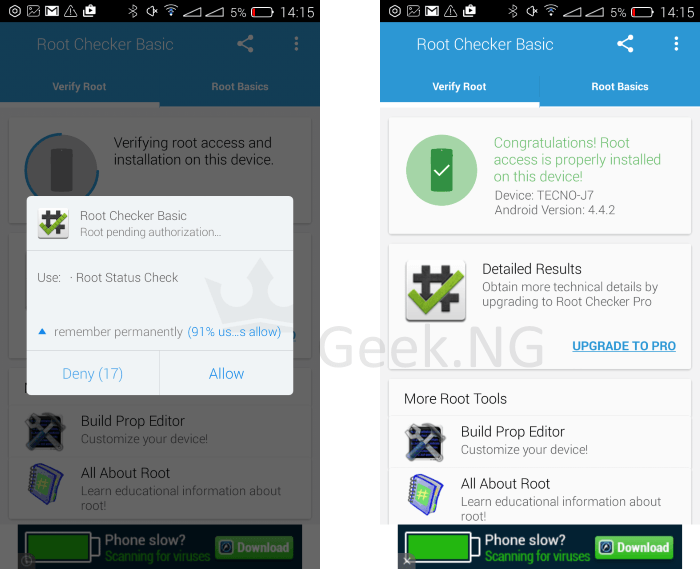
10. It is advised you reboot your device. By now, a new app called KingUser should be installed on your device. Need to verify if the device has really been rooted?
tecno boom j7 rooted

You can download Root Checker Basic from the PlayStore.


Previous Post
EXCLUSIVE: What We Know About The Upcoming Infinix Zero 2
Next Post
Press Release: GTBank Introduces Fund Transfer on Mobile with USSD Code
Wale Adekile
Husband to the world's most beautiful woman and father to two awesome kids. A nerd, obviously; also, a technical business analyst, a web designer who preaches the gospel of WordPress, and a writer. You can check out my published books on Amazon.
google chrome android
Android

Fix: Google Chrome Opening Tabs Automatically on Android

8 years ago
wico i6
AndroidApple iOSMobile

Counterfeit iPhone 6 Running Andriod OS Now on Sale… in China

12 years ago

Recent Articles

yunmai massage gun mini 2.
Yunmai Massage Gun Mini 2 Review
BenQ LaptopBar Review: The Accessory I didn’t Know I Needed
teendow g20
Teendow Robot Vacuum G20 Review
Yunmai EasePro Massage Gun Review
bathroom
Dear Men, Spraying All Over the Toilet Seat is Disgusting and Irresponsible
winx mediatrans
How to Transfer Photos from iPhone to Computer Without iTunes
How to Use WhatsApp on an iPad
Things to Consider When Buying a MacBook
programmer
Learning to Code: A Comprehensive Guide for Beginners
identity thief
How to Efficiently Prevent Identity Theft

All contents on this blog are copyright protected and cannot be reproduced on other websites without permission.

Copyright © 2022 – NerdieDad | Home | Contact | About | Privacy Policy