I’m sure if Facebook takes a poll on whether people are comfortable with the timeline profile, up to fifty percent would love to have their old profile layout back. The last post I wrote on disabling timeline and getting back the old profile layout doesn’t work anymore because in most cases, there’s no developer app to delete. I must let you know that this tweak doesn’t fix any privacy issue you might have with timeline, visitors to your profile will still see your timeline instead of the old profile layout. This only displays your profile to you using the old style and it’s just for your view only. It’s a matter of personal taste. The logic behind this is making facebook believe your browser doesn’t support the timeline feature and reverts you back to the old profile layout, got it?
Switching Back to Old Facebook Profile Layout Without Developer App
For Firefox Users:
1. Download and install User Agent Switcher addon.
2. Go to Tools > User agent Switcher > Internet Explorer > Select Internet Explorer 7

3. Now check your profile to see the old profile show up.
You might see some formatting errors like a large white space at the top. You can fix this by installing this addon by FBPurity
For Google Chrome Users:
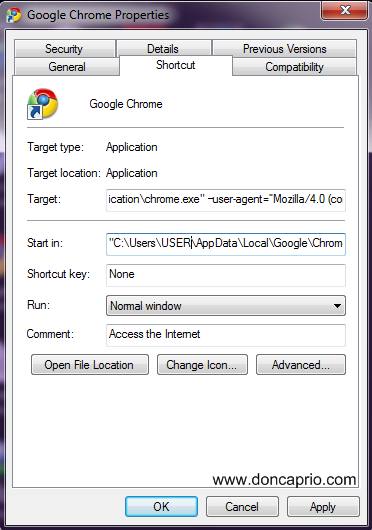
1. Right click the Google Chrome icon on your desktop or Start Menu.
2. Select the Shortcut tab.
3. Paste the following code in the Target window after what you have there by default. You leave a space and paste the code below after ““C:Program FilesGoogleChromeApplicationchrome.exe”:
For Windows Vista & Windows 7
–user-agent=”Mozilla/4.0 (compatible; MSIE 7.0; Windows NT 6.0)”
For Windows XP
–user-agent=”Mozilla/4.0 (compatible; MSIE 7.0; Windows NT 5.1)”
For Windows 7, you should then have something like “C:Program FilesGoogleChromeApplicationchrome.exe”<SPACE>–user-agent=”Mozilla/4.0 (compatible; MSIE 7.0; Windows NT 6.0)”
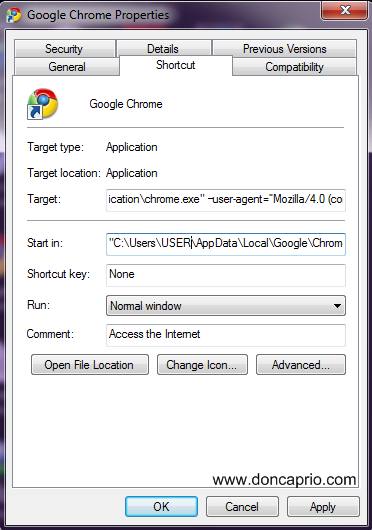
4. Now restsart your browser and refresh visit your profile. You should now see your timeline switched back to the old profile layout. If you get formatting errors like a blank white space, download and install this addon.
For Opera Browser:
This trick doesn’t work in Opera as it doesn’t support changing the user agent to specific versions of Internet Explorer like other browsers.
For Internet Explorer:
If you’re using Internet Explorer 7, then I’m sure you’re still viewsing your profile with the old profile layout but if you’re using Internet Explorer 8 or later versions, you only need to do some compatibility settings so your browser tries getting you that old facebook profile layout by viewing facebook as Internet Explorer 7.
1. Go to your facebook profile.
2. Click on Tools > Compatibility View Settings.
3. Fill in facebook.com, click on “Add” and then “Close”.
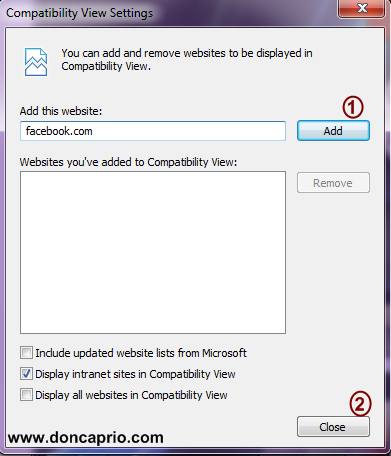
4. Refresh your profile page to see if it works.
Like I mentioned earlier, this tweak only switches the your profile back to the old layout for you only. Visitors to your profile still see your timeline. There’s no sure know to totally disable facebook timeline for now, you can only try to limit or hide it or try deleting all your old posts.