


Popular posts are your most commented blog posts. Showing off your popular posts is definitely a way to keep visitors longer, one of the displayed post might have gone into archive but still pretty much relevant. Who knows, some of your visitors might still be in need of it.
Displaying popular posts on your blogspot site needs no special HTML knowledge and you don’t even need to edit your template html manually. Follow the steps below and implement any of the given codes on your blog depending on your taste:
1. Login to your blog and click on “Design”
2. Depending on where you want to display this widget, click on “Add a Gadget”
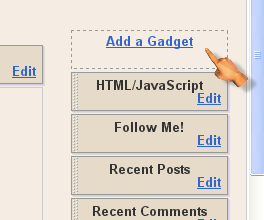
3. Select HTML/JavaScript

4. To display the posts in this format
My Blog Post A (10 comment)
My Blog Post B (9 comments)
My Blog Post C (8 comments)
<script type="text/javascript">
function pipeCallback(obj) {
document.write('<ol style="text-transform: capitalize;">');
var i;
for (i = 0; i < obj.count ; i++)
{
var href = "'" + obj.value.items[i].link + "'";
var item = "<li>" + "<a href=" + href + ">" + obj.value.items[i].title + "</a> </li>";
document.write(item);
}
document.write('</ol>');
}
</script>
<script src="http://pipes.yahoo.com/pipes/pipe.run?_render=json&_callback=pipeCallback&_id=ML4p0UfW3RGgS7iN1JzWFw&url=http%3A%2F%2FYOUR_BLOG_ADDRESS_WITHOUT_HTTP://&num=7" type="text/javascript"></script>
<a href="https://www.doncaprio.com" target="_blank"><span style="font-size: xx-small;">Popular Posts Widget</span></a>
To display in this format:
My Blog Post A (10)
My Blog Post B (9)
My Blog Post C (8)
<script type="text/javascript">
function pipeCallback(obj) {
document.write('<ul style="text-transform: capitalize;">');
var i;
for (i = 0; i < obj.count ; i++)
{
var href = "'" + obj.value.items[i].link + "'";
var item = "<li>" + "<a href=" + href + ">" + obj.value.items[i].title + "</a> </li>";
document.write(item);
}
document.write('</ul>');
}
</script>
<script src="http://pipes.yahoo.com/pipes/pipe.run?_render=json&_callback=pipeCallback&_id=28a6afad7c6ba1288c1b738277e42385&url=http%3A%2F%2FYOUR_BLOG_ADDRESS_HERE_WITHOUT_HTTP://&num=7" type="text/javascript"></script>
<a href="https://www.doncaprio.com" target="_blank"><span style="font-size: xx-small;">Popular Posts Widget</span></a>
To display without number of comments like this:
My Blog Post A
My Blog Post B
My Blog Post C
<script type="text/javascript">
function pipeCallback(obj) {
document.write('<ol style="text-transform: capitalize;">');
var i;
for (i = 0; i < obj.count ; i++)
{
var href = "'" + obj.value.items[i].link + "'";
var item = "<li>" + "<a href=" + href + ">" + obj.value.items[i].title + "</a> </li>";
document.write(item);
}
document.write('</ol>');
}
</script>
<script src="http://pipes.yahoo.com/pipes/pipe.run?_render=json&_callback=pipeCallback&_id=097d1b822fc6f356d8376802a911036b&url=http%3A%2F%2FYOUR_BLOG_ADDRESS_WITHOUT_HTTP://&num=7" type="text/javascript"></script>
<a href="https://www.doncaprio.com" target="_blank"><span style="font-size: xx-small;">Popular Posts Widget</span></a>
5. The number “7” shown in blue determines the number of posts that will be shown. You can change to whatever number you like.
Also, make sure you completely replace the area in the code shown in red with your blog’s address without “http://”!
The widget works perfectly and if it doesn’t, I suggset you take a look at your blog address in the code.












)
&description=&image=https://doncaprio.com/wp-content/uploads/2011/12/blogger1.png)