

+321 123 4567
info@test.com
  • Home
  • My Services
    • Web Design
    • Web Development
    • Technical Writing
    • Portfolio
  • My Thoughts
  • Free Tools
    • Photo Editor
    • Avatar Generator
    • Email Migration Tool
    • QR Code Generator
    • RSS to HTML Converter
    • IP Address Geolocation
    • Base64 Image Encoder
    • NATO Translator
    • All Tools
  • Contact
Home
Apple iOS
Fix: Jailbroken iPhone, iPad or iPod Appearing as “Jailed” in iFunbox

Fix: Jailbroken iPhone, iPad or iPod Appearing as “Jailed” in iFunbox

Wale Adekile
December 31, 2013

Update:  This might not work for iOS 7.1 and above. There’s a better fix for iOS 7.1.2 jailbreak here.


One of the reasons we jailbreak our devices is to have total control over it. Having full access to the file system is important to get certain things done but without jailbreaking, this is impossible. iFunbox, iPhone Browser and other software programs lets you access your file system and even do stuffs over SHSH but there are limits when your device isn’t jailbroken.

Also read: AppSync for iOS 7 and 30+ Useful iOS 7 Compatible Tweaks ,Apps & Free Repos

I was trying to transfer a custom Zeppelin logo I created into my device’s file system the other day and was surprised to it as a “jailed” device without having access to system folders and other stuffs.
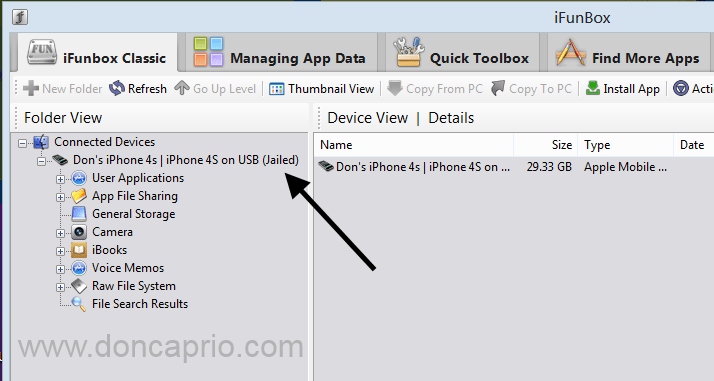
jailed iPhone

A certain service (afc2) is needed to browse the whole file system on the iPhone and when it’s absent, USB browsers like iFunbox and iPhoneBrowsers will see your jailbroken device as a jailed one.


AFC (Apple File Connection) is a service that runs on every iPhone / iPod, which iTunes uses to exchange files with the device. It is jailed to the directory /private/var/mobile/Media, which is on the second (non-OS) partition. The AFC service is handled by /usr/libexec/afcd, and runs over the usbmux protocol.

AFC2 is a an additional AFC service, configured to allow access to the whole filesystem. Installing it and patching the fstab file for full write access is considered a bare-bones jailbreak. The AFC2 service is added by editing the /System/Library/Lockdown/Services.plist file and adding a service that runs under root with access to the Root filesystem.How to Fix

There’s only a simple fix for this and it’s by adding this service through Cydia. Search Cydia for “afc2add” and install.
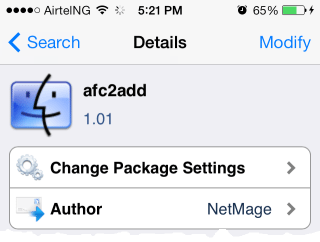
afc2add

This should reboot your device after installation and fix the issue. This tweak can be found in ModMyi repository (http://apt.modmyi.com/).


Previous Post
Nokia’s Android Phone – Why Would It Be the Best Option?
Next Post
Attracting Visitors Through Web Presentation
Wale Adekile
Husband to the world's most beautiful woman and father to two awesome kids. A nerd, obviously; also, a technical business analyst, a web designer who preaches the gospel of WordPress, and a writer. You can check out my published books on Amazon.
iphone 7 concept
Apple iOS

Rumor: iPhone 7 To Have 256GB Storage & A Larger Battery

10 years ago
how to backup cydia packages
Apple iOS

How to Backup Cydia Tweaks and Apps to .deb Packages on your Computer

14 years ago

Recent Articles

yunmai massage gun mini 2.
Yunmai Massage Gun Mini 2 Review
BenQ LaptopBar Review: The Accessory I didn’t Know I Needed
teendow g20
Teendow Robot Vacuum G20 Review
Yunmai EasePro Massage Gun Review
bathroom
Dear Men, Spraying All Over the Toilet Seat is Disgusting and Irresponsible
winx mediatrans
How to Transfer Photos from iPhone to Computer Without iTunes
How to Use WhatsApp on an iPad
Things to Consider When Buying a MacBook
programmer
Learning to Code: A Comprehensive Guide for Beginners
identity thief
How to Efficiently Prevent Identity Theft

All contents on this blog are copyright protected and cannot be reproduced on other websites without permission.

Copyright © 2022 – NerdieDad | Home | Contact | About | Privacy Policy









