+321 123 4567
info@test.com
  • Home
  • My Services
    • Web Design
    • Web Development
    • Technical Writing
    • Portfolio
  • My Thoughts
  • Free Tools
    • Photo Editor
    • Avatar Generator
    • Email Migration Tool
    • QR Code Generator
    • RSS to HTML Converter
    • IP Address Geolocation
    • Base64 Image Encoder
    • NATO Translator
    • All Tools
  • Contact
Home
Blogger
Submit Your Blog’s Sitemap To Google

Submit Your Blog’s Sitemap To Google

Wale Adekile
November 26, 2010

If you intend to be listed in google search results, then I guess you must tell google about every single page on your site. Submitting your sitemap to google goes a long way in SEO (search engine optimization).Google Webmaster Tools shows you


-search results in which your site appear
-how your site ranks in all search queries
-click through rate (what percentage of people actually visited via that search result)
-all sites linking to your blog
-keywords that drive visitors to your site
-certain errors you might not be aware of.

After signing in to Google Webmaster Tools with your google account, you must add your blog and verify ownership. Follow these steps:

1. Add your site

2. You’re asked to verify domain ownership on the next page. Select “ADD META TAG TO MY SITE’S HOMEPAGE” then copy the code given.


3. Login to your blogger Dashboard, click on Design, then Edit HTML

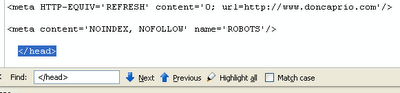
4. Search for this code:

<head>

5. Now, just after this code, paste the code you copied earlier and save your template.

6. Go back to your Google Webmaster Tools and click on verify.

7. The next step now is submitting your sitemap. Select Site Configuration from the links on the left sidebar and click submit sitemap.


8. Now paste this in the space provided after your blog’s address

/atom.xml?redirect=false&amp:start-index=1&amp:max-results=500

That’s all. Google now has your sitemap for easy crawling.


Previous Post
How To Set Up Blogspot Address To Use Custom Domain
Next Post
How To Cash Google Adsense Cheque In Nigeria
Wale Adekile
Husband to the world's most beautiful woman and father to two awesome kids. A nerd, obviously; also, a technical business analyst, a web designer who preaches the gospel of WordPress, and a writer. You can check out my published books on Amazon.
Blogger

How To Redirect A Blog To Another Blog or Address

15 years ago
BloggerBlogging Tips

How To Disable Right Click On Your Blog

15 years ago

Recent Articles

yunmai massage gun mini 2.
Yunmai Massage Gun Mini 2 Review
BenQ LaptopBar Review: The Accessory I didn’t Know I Needed
teendow g20
Teendow Robot Vacuum G20 Review
Yunmai EasePro Massage Gun Review
bathroom
Dear Men, Spraying All Over the Toilet Seat is Disgusting and Irresponsible
winx mediatrans
How to Transfer Photos from iPhone to Computer Without iTunes
How to Use WhatsApp on an iPad
Things to Consider When Buying a MacBook
programmer
Learning to Code: A Comprehensive Guide for Beginners
identity thief
How to Efficiently Prevent Identity Theft

All contents on this blog are copyright protected and cannot be reproduced on other websites without permission.

Copyright © 2022 – NerdieDad | Home | Contact | About | Privacy Policy